Table of Contents
- Key takeaways
- What is a social media competitive analysis template?
- What does the template include, and how long does each part take?
- Sheet 1: Who goes on your competitor list?
- Sheet 2: What goes in the profile audit?
- Sheet 3: How do you audit their posts?
- Sheet 4: What goes in the comment and question log?
- Sheet 5: How do you build the gap map?
- What does a filled-in example look like?
- Why should buyer questions weigh more than like counts?
- How do you turn the template into posts?
- How often should you rerun it?
- Where does this template fall short?
- What are the common mistakes?
- FAQ
Last updated: October 29, 2026
What changed: rewritten as a copy-ready LinkedIn template for founders, replacing the multi-platform guide, the vendor comparison table and the broken link.
The short answer. A social media competitive analysis template is a set of blank tables and checklists you fill in while you study the accounts your audience already follows. For a founder on LinkedIn, that means five sheets: a competitor list, a profile audit, a post audit, a question log and a gap map. You copy them into a doc or spreadsheet, fill them from public profiles, and finish with one sentence that names the lane you will claim. There is no separate file. Everything you need is on this page.
The reasoning behind the method lives on the sister page, social media competitor analysis on LinkedIn. This page is the fill-in version.
Key takeaways
- The template has five sheets, and you can copy each one straight from this page.
- Your "competitors" are the people your buyers already follow, including direct rivals, adjacent experts and big names.
- You can see public reactions and comments on other people's posts. You cannot see their impressions or analytics.
- Buyer questions and case-study posts tell you more than like counts do.
- The output is one sentence naming your lane, then two weeks of posts built from it.
What is a social media competitive analysis template?
It is a reusable set of blanks that keeps an audit consistent. Instead of scrolling through rivals and forming an impression, you record the same things for every profile and compare them side by side. The point is to see what everyone says in the same way, what buyers ask that nobody answers well, and where your own experience fits.
Templates online usually cover Facebook, Instagram, TikTok, X and YouTube at once. This one covers LinkedIn only, because that is where founders start sales conversations under their own name, and a single channel keeps the sheets short enough to finish in an afternoon.
What does the template include, and how long does each part take?
Here are the five sheets side by side. The times are rough planning figures, so adjust them to your pace.
| Sheet | What you fill in | Where you find it | Time to plan for | What it tells you |
|---|---|---|---|---|
| 1. Competitor list | Names, type, why your buyer follows them, link | Your buyers' follows and comment sections | About 30 minutes | Whose attention you are competing for |
| 2. Profile audit | Headline, About, Featured, banner, promise, audience, proof | Each public profile | About 10 minutes per profile | How rivals position themselves in the first minute |
| 3. Post audit | Topic, format, hook, proof, CTA, visible reactions, buyer comments | Each profile's recent posts | About 20 minutes per profile | What is already covered and what gets a response |
| 4. Question log | Questions buyers ask that nobody answers well | The comment sections of those posts | Runs alongside sheet 3 | The gap, in your buyer's own words |
| 5. Gap map | Repeated claims, open questions, your proof, your lane | Your finished sheets | About 30 minutes | The lane you can claim |
If you track 6 profiles, plan for a long afternoon or two short sessions.
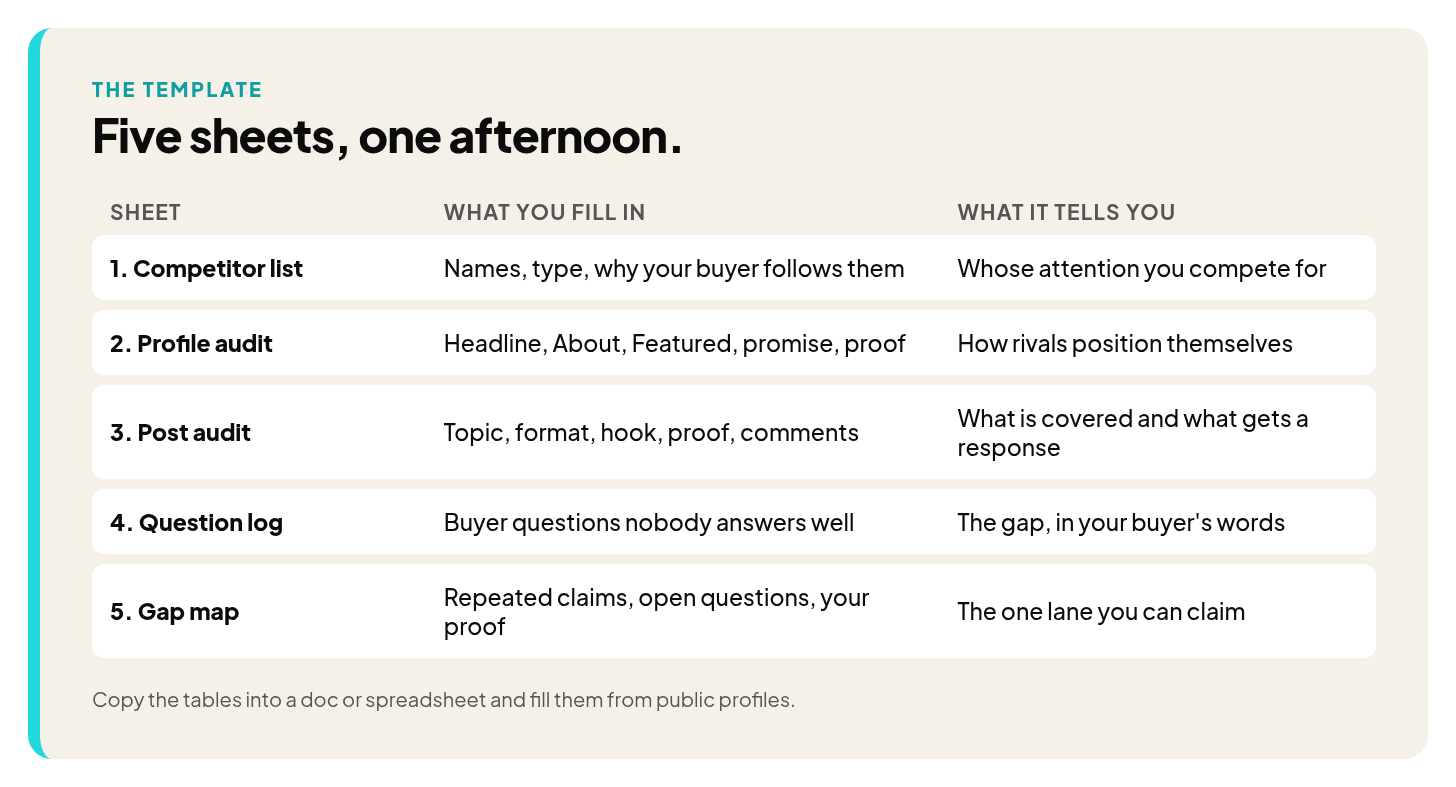
The five sheets of the social media competitive analysis template and what each one tells you
Sheet 1: Who goes on your competitor list?
Aim for 5 to 10 rows. Fewer than five lets one loud voice skew what you see. More than ten and you start skimming.
Pick people who have posted in the last few weeks, and mix three kinds:
- Direct rivals. People who sell what you sell to the same buyer.
- Adjacent experts. People who serve your buyer with a different service.
- Big names your buyers follow. Well-followed voices in your space, even if they sell something unrelated.
To find them, open the profiles of a few recent clients or prospects and note who they follow and who shows up in their comments. Copy this table into your doc.
| Name | Type (direct, adjacent, big name) | Why my buyer follows them | Profile link | Posted in the last month? |
|---|---|---|---|---|
| ㅤ | ㅤ | ㅤ | ㅤ | ㅤ |
| ㅤ | ㅤ | ㅤ | ㅤ | ㅤ |
| ㅤ | ㅤ | ㅤ | ㅤ | ㅤ |
| ㅤ | ㅤ | ㅤ | ㅤ | ㅤ |
| ㅤ | ㅤ | ㅤ | ㅤ | ㅤ |
Add rows until you reach at least five. If you cannot name a single direct rival, that is useful too, and the FAQ below covers what to do.
Sheet 2: What goes in the profile audit?
Read each profile the way a buyer would in the first minute, before they scroll to a single post. Copy this checklist once per profile and paste the exact wording wherever it asks for words.
- Headline. Paste the exact words. Does it name an audience, or only a job title?
- About section. Paste the first two lines. Who is it for, and what problem does it name?
- Featured section. What is pinned: a case study, a booking link, a lead magnet, press or nothing?
- Banner. Does it say anything at all, or only look finished?
- What the profile promises. Write the promise in one sentence of your own.
- Who it is for. Is the audience named anywhere, or left for the visitor to guess?
- Proof shown. Client results, named outcomes, recommendations, anything a visitor could check.
The proof line deserves your closest attention. Proof is the one thing a rival cannot copy from you, so it points toward your lane.
Sheet 3: How do you audit their posts?
Open each profile and review the last 10 to 20 posts. Fewer than ten gives you too thin a picture, and more than twenty takes longer without adding much. Copy this table and add one row per post.
| Profile | Topic | Format (text, carousel, video, poll) | Hook type | Proof used (case study, opinion, how-to) | CTA, if any | Visible reactions and comments | What buyers said in the comments |
|---|---|---|---|---|---|---|---|
| ㅤ | ㅤ | ㅤ | ㅤ | ㅤ | ㅤ | ㅤ | ㅤ |
| ㅤ | ㅤ | ㅤ | ㅤ | ㅤ | ㅤ | ㅤ | ㅤ |
| ㅤ | ㅤ | ㅤ | ㅤ | ㅤ | ㅤ | ㅤ | ㅤ |
Two notes on filling it in.
First, hook type means how the post opens. Write a short label such as a question, a claim, a story or a number, and keep your labels consistent across profiles so you can compare them.
Second, you can only record what is public. LinkedIn's help page on post analytics says "Only you can view your post analytics." That means you will see reactions and comments on someone else's post, and you will never see their impressions or how many buyers read it quietly. The same help system explains that your own content shows up in Analytics & tools, where you can pick a date range from the past 7 days up to the past 365 days. Impressions are the number of times a post was displayed on screen, and LinkedIn describes them as an estimate. So your own numbers are an estimate, and other people's numbers are out of reach.
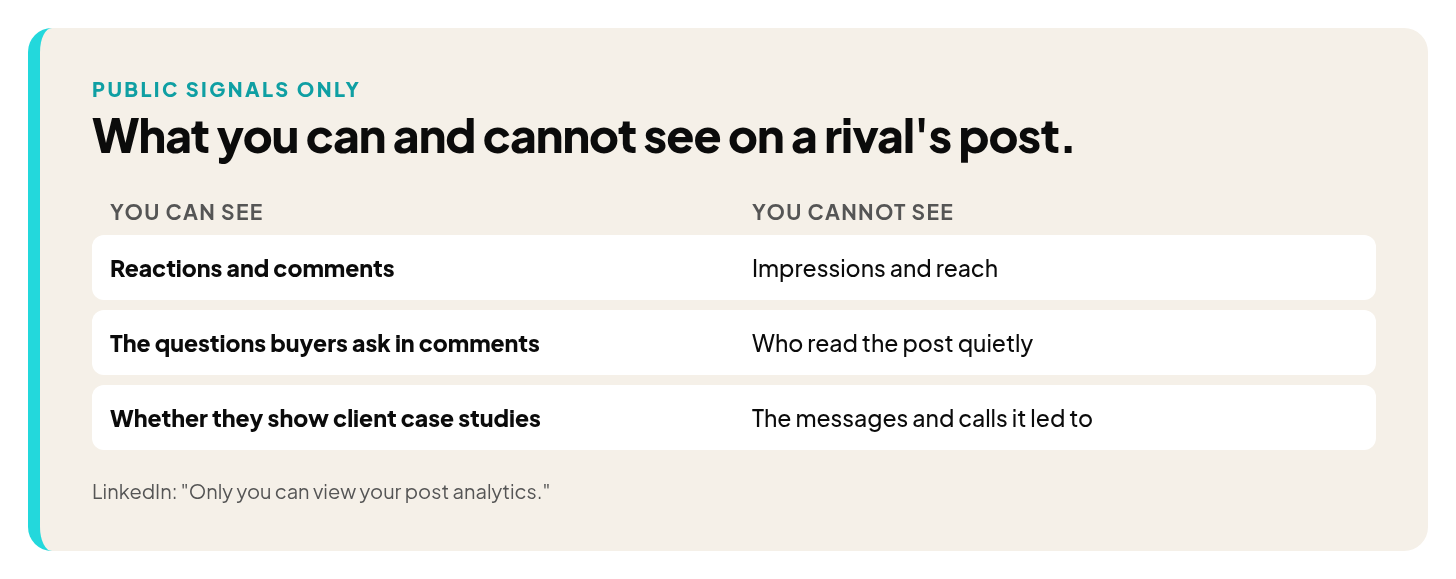
What you can and cannot see on a competitor's LinkedIn post
Sheet 4: What goes in the comment and question log?
Comments are where the most useful material sits. Keep a separate list of every question a buyer asks under these posts, especially the ones that get a vague reply or no reply at all. A question that sits unanswered under a well-followed post tells you what your buyer wants and is not getting.
| Question, in the buyer's own words | Where it appeared (profile and topic) | Answered well, answered vaguely, or unanswered | Can I answer it from my own work? |
|---|---|---|---|
| ㅤ | ㅤ | ㅤ | ㅤ |
| ㅤ | ㅤ | ㅤ | ㅤ |
| ㅤ | ㅤ | ㅤ | ㅤ |
Copy the wording exactly. A buyer's phrasing often makes a better post hook than anything you would write yourself.
Sheet 5: How do you build the gap map?
Now sort what you gathered into four short entries. Write each in full sentences, because bullet fragments are hard to read again a month later.
| Entry | What to write |
|---|---|
| What everyone says the same way | The claims that appear across several profiles in near-identical words. Your buyer has read these already. |
| What nobody covers | The topics and formats that appear on none of your rows. |
| Where my proof fits | The results, stories and client experience that belong to you and that no profile on your list can show. |
| The one lane I will claim | One sentence: the audience, the problem and the proof only you have. |
Your lane sits where the unanswered questions from sheet 4 overlap with your own proof, and where the repeated claims are thinnest. If you fill that last row with more than one answer, pick the one your buyers ask about most often. The reasoning for choosing a single lane is in pick one lane on LinkedIn. If you cannot fill the proof row at all, that is worth knowing before you commit to anything.
What does a filled-in example look like?
This is an illustrative example, not a real audit. Suppose a fractional CFO who works with early-stage software founders fills in two rows of sheet 3 and one entry of the question log. The names and posts are invented to show the shape.
| Profile | Topic | Format | Hook type | Proof used | CTA | Visible reactions and comments | What buyers said |
|---|---|---|---|---|---|---|---|
| [Rival A, direct] | Why founders should track cash weekly | Text | Bold claim | Opinion | None | Several reactions, a few comments | A founder asked how to start when there is no finance person yet |
| [Expert B, adjacent] | A pricing change explained | Carousel | Story | Case study | Link to book a call | Few reactions, one long comment | A reader asked how the change affected churn |
| Question | Where it appeared | Status | Can I answer it? |
|---|---|---|---|
| How do I start tracking cash when there is no finance person yet? | Rival A, weekly cash post | Unanswered | Yes, from my own client work |
The gap map entry could then read: "Everyone tells founders to track cash weekly. Nobody shows the first setup for a company with no finance hire. I can show it from my own client work." That sentence is a draft lane. It is specific and it rests on proof only this person has.
Why should buyer questions weigh more than like counts?
Because the reactions you log are only a slice of what happened. We see this in client accounts: "Most of the sales our clients get come from people who never engage with the content. They just watch."
If that is true of the people you study, then a post with few visible reactions may still have reached the buyer who later sent a message. You cannot tell from outside. So treat reactions as a clue about topics, and give more weight to two things you can actually see: the questions buyers ask, and whether a profile shows client case studies at all. Conversion posts are basically client case studies, so a profile that shows real client outcomes is doing something different from one that only shares opinions.
Two clients show how far reach and results can drift apart. One is a CEO and a mild skeptic who keeps his network small on purpose. The most useful outcome for him was that he could name people he met and won business from through LinkedIn. Another client runs an education business, and his down months on impressions were his best months on revenue. The "last day to sign up" posts flop on reach, but that is when the business closes.
Neither result would show up on a competitor's public like count, which is why the template asks you to log questions and proof, and leaves the scoreboard alone.
How do you turn the template into posts?
Take your finished gap map and plan two weeks of posts around the one lane. A simple way to do it:
- Start with your top three open questions from sheet 4. Write one post that answers each, using your own client work as the example.
- Add one proof post. Pick the strongest result or story from the proof row of your gap map and tell it plainly.
- Add one post that challenges a repeated claim. Take the line everyone on your list says in the same words, and say what you have seen that differs.
- Avoid the topics from the "what everyone says" row, unless you have a specific story that changes the point.
Then watch what comes back. One belief I took from my own start on LinkedIn is that you can only get better by posting, trying it, seeing the data, seeing the results, talking to people, engaging, seeing what people want. The audit gives you a head start on that last part.
For more help turning a lane into a repeating plan, the ultimate content strategy framework guide covers the mix of post types. If your buyers fall into very different groups, audience segmentation examples can help you decide whose questions to answer first.
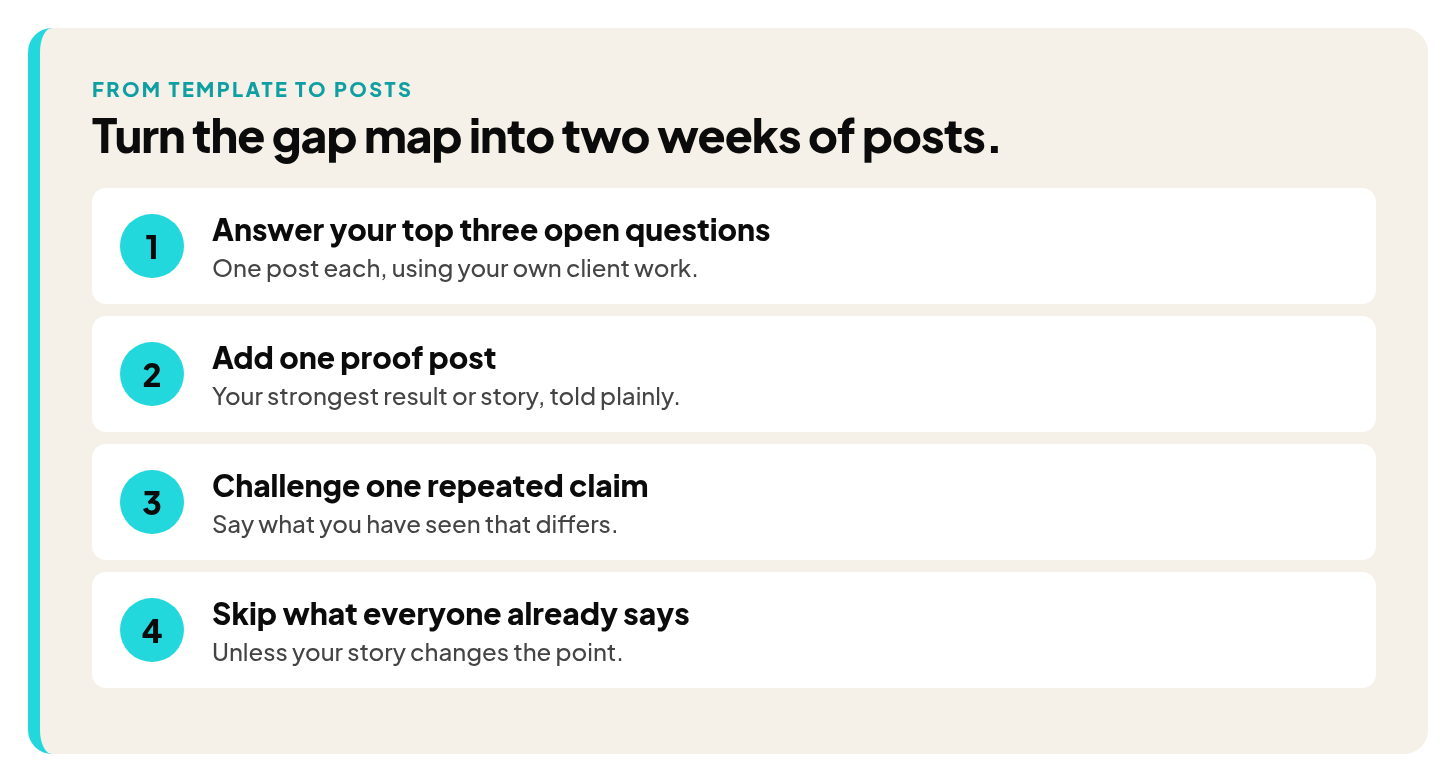
Four steps to turn the gap map into two weeks of posts
How often should you rerun it?
As a suggestion, do a light refresh each quarter. Open the same sheets, check whether anyone new has appeared in your buyers' comments, and note which gaps are still open. Do a full rerun when you change your offer or audience, or when your posts start to sound like everyone else's. Keep your old sheets so you can see what changed.
Where does this template fall short?
It has honest limits, and you should know them before you rely on it.
- No access to anyone else's analytics. You see public reactions and comments only, never impressions, reach or who read a post silently.
- A small sample. Five to ten profiles and 10 to 20 posts each is a snapshot, and one unusual week can skew it.
- Public signals only. Private messages, calls and the posts you never see do not appear on any sheet.
- It does not measure your own results. For that, see social media analytics tools and how to measure social media ROI, which cover tracking your own numbers and tying them to business outcomes.
What are the common mistakes?
- Filling in the sheets and stopping. A pile of notes is not a lane. Write the one-sentence version before you close the document.
- Copying the biggest name. The leader on your list has an audience, a history and proof that belong to them. Borrowing their voice makes you the second version of something your buyers already follow.
- Judging yourself by their like counts. You cannot see their reach, and likes do not show who bought.
- Listing only direct rivals. Your buyer also follows adjacent experts and big names, so a list of direct rivals alone misses much of what they read.
- Changing your labels midway. If you call a hook a question on one profile and a challenge on another, the comparison breaks. Pick your labels first.
If you want an older, more general take, create distinctive content through competitor analysis is still a useful read.
FAQ
What is a social media competitive analysis template?
It is a set of blank tables and checklists you fill in while reviewing the accounts your audience follows. This page gives you a LinkedIn version with five sheets that you copy into a doc or spreadsheet.
How many competitors should I include?
Five to ten profiles. Fewer than five lets one voice skew your read, and more than ten tends to turn into skimming.
How long does it take?
Plan on an afternoon for a list of five to ten, or two shorter sessions. The post audit takes the most time, and the profile audit takes the least.
How often should I redo it?
As a suggestion, run a light refresh each quarter and a full rerun when your offer, audience or market changes.
What if I have no direct competitors on LinkedIn?
Use adjacent experts and big names. Your buyer still follows people who compete for their attention, even if none of them sell what you sell. If you work with a LinkedIn content coach for founders, bring the filled sheets to the session so the conversation starts from real examples.
Can tools do the analysis for me?
Tools can collect some public data, but they cannot tell you what your buyers are asking or what only you can prove. They also cannot show another person's private analytics. The judgment calls on sheets 4 and 5 stay with you.
Is a template enough, or do I need a full competitor analysis?
The template is the working version of a full analysis. If you want the reasoning behind each step, read the competitor analysis method page first, then use these sheets to do the work.
I'm Frank Velasquez. I'm Head of Content at a ghostwriting agency, and I run Mentorship on the side for four founders at a time. You can find me on LinkedIn.
If you want to talk through your own audit and lane, you can Book a discovery call.